Knowledge base
Build for Hack The Beats
You already know Strudel, or you are about to. This page is about what happens to your code once it is on the site: how a song is read, which of its lines become controls and pictures, what a DJ can do with it that your code never has to handle, and how to write a song that takes advantage of all that. You write the song; the site turns it into an instrument someone else can play.
Strudel in ten lines
A song here is plain Strudel. Anything that plays on strudel.cc plays here, with the few exceptions under the sound palette and in the reference. If you are new to it, here is the part of the language that nearly every song on the site is made of.
setcps(124/60/4)                       // the tempo: 124 beats a minute, one cycle per bar

KICK: s("bd*4").bank("RolandTR909")    // four kicks a bar, from the 909
CLAP: s("[~ cp]*2")                    // rest then clap, twice: claps on two and four
HATS: s("hh(3,8)")                     // three hats spread evenly over eight steps
BASS: note("<a1 a1 c2 g1>*2")          // one note per bar, four bars in a row, twice as fast
  .s("sawtooth")                       // played on a sawtooth synth
  .lpf(900)                            // through a low-pass filter at 900 Hz
  .gain(0.5)                           // at half level
LEAD: n("0 2 4 7").scale("A4:minor")   // scale steps instead of note names
  .room(0.4)                           // in a little reverb
The text inside double quotes is mini-notation, Strudel's language for rhythm.
Space separates steps in a bar, ~ is a rest, *4 repeats a step four times inside its
space, [ ] groups steps so they share one space, <a b> plays one of its items per
cycle in turn, and (3,8) is a Euclidean rhythm, three hits spread over
eight steps. s() picks a sample or a synth, .bank() picks the drum machine the drum names
come from, note() plays note names and n() with .scale() plays scale
degrees. .lpf(), .room() and .gain() are a filter, a reverb and a level. And
setcps() sets the tempo in cycles per second, which is
why songs write it as beats per minute divided by sixty and by four: one cycle is then one bar of
four beats, which is what the whole site assumes.
That is where this guide stops teaching Strudel and strudel.cc's own workshop takes over: it covers every function in the lines above, and hundreds more, with sound. Learn it there, write here.
Start a song
There are four ways to get a song onto the deck, and all of them end in the same place: a song of yours in My songs.
- New, in the song list (B), offers two starters: Drum loop, one track of drums and one knob with room to add your own, or Full song, drums, bass and a lead with three knobs. Both use only sounds that are always loaded, and each carries a couple of suggestions to try.
- Import, beside it, takes a file: a single song as
.strudel,.js,.stror.txt, or a pattern export from strudel.cc as.json, with any number of patterns in one file. So you can write on strudel.cc, where the whole language is documented and the REPL is quick, export, and import here. Export goes the other way, with all your songs in one strudel.cc-format file. - The examples in this guide. Every Open in the player button on these pages loads that song onto deck A. It is nobody's song yet: press play, and Save a copy keeps it as a song of your own to take apart.
- In a local copy of the site, drop a file into
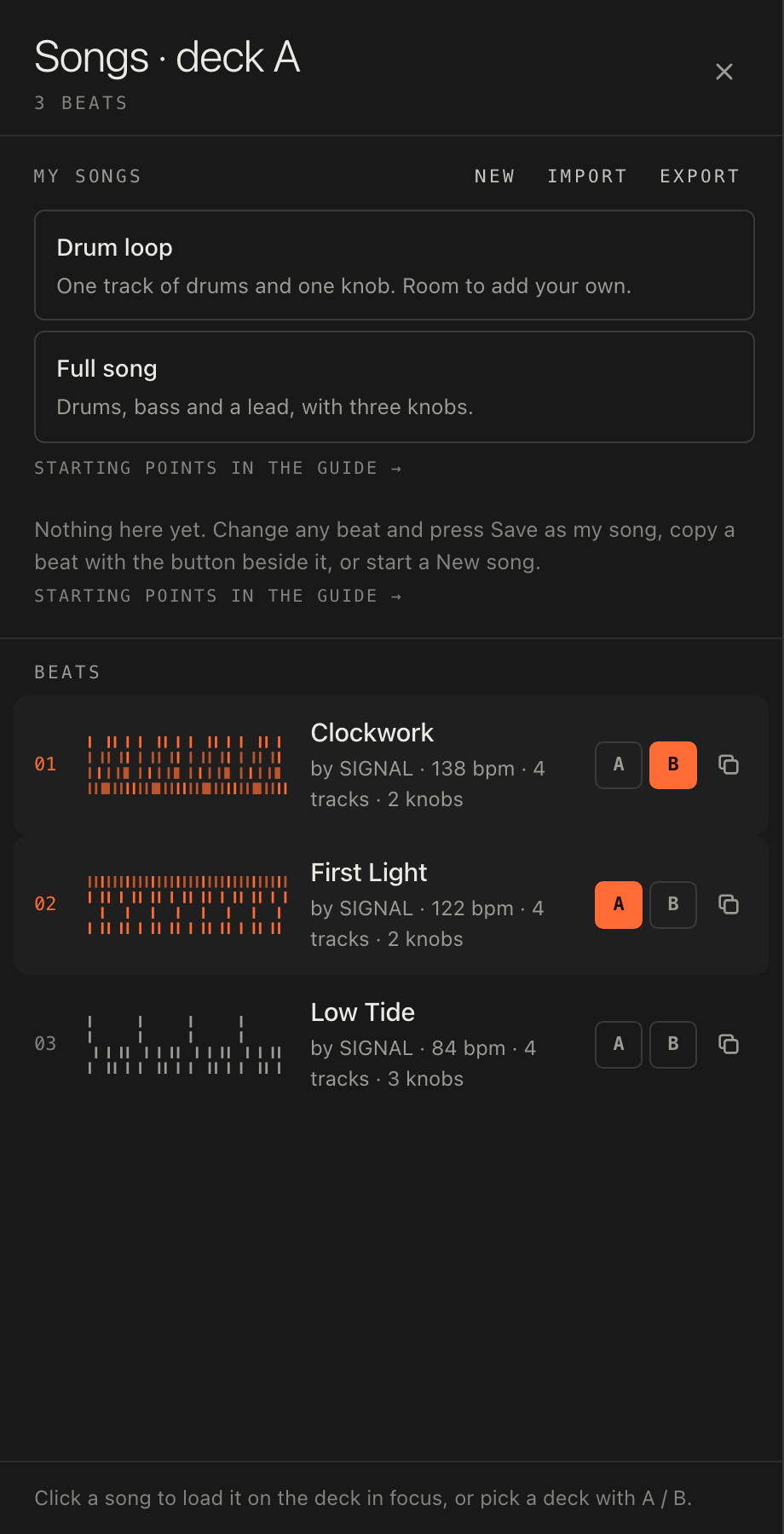
beats/and reload; it appears beside the demo beats First Light, Low Tide and Clockwork. The repository README has the details.
Then shape it for the stage, which is what the rest of this page is about: a header, labels, named knobs, a switch or two, suggestions, notes for the song map, a visual or two and a 32-bar form. None of it is required. A bare pattern plays. But each one gives a listener something to hold.
How the site reads your code
The site reads the code before it runs it, the way you would read a score, and builds the deck from what it finds. Nothing is declared, nothing is configured: the code is the configuration.
| You write | The listener gets |
|---|---|
DRUMS: s("bd*4") | A channel called DRUMS in the mixer: a level with a real meter, mute, solo and a capture button. The first twelve channels answer to the keys 1 to 9, 0, - and =. |
$: note("c2 g2").s("sine") | A channel too, named from the first sound it plays (here SINE), or "track" if there is none. |
_PAD: … or PAD_: … | A muted layer: a channel that comes up muted, ready to be brought in live. |
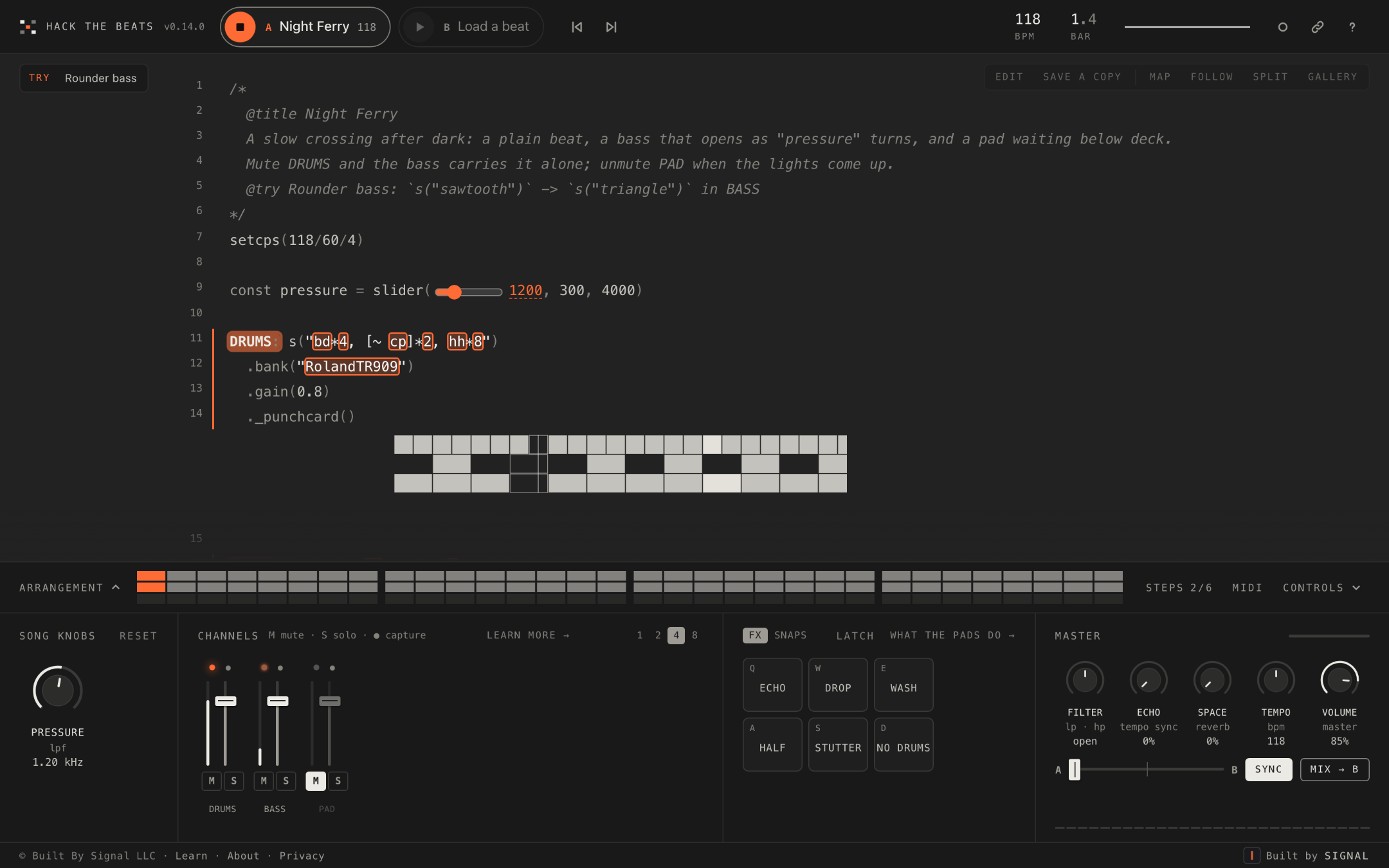
const pressure = slider(1200, 300, 4000) | A knob called PRESSURE, 300 to 4000, with a sub-label saying what it feeds. The same slider is drawn in the code; knob and slider are one control. |
.lpf(slider(900, 200, 4000)) inline | A knob named after its track and the parameter, BASS · lpf: accurate, less inviting. |
const mood = 0 with a header line mood: 0 minor, 1 major | A switch with named positions. Turning it re-runs the song in that version. |
const part = 0 // 0-2 | A switch with positions 0 to 2, from the comment beside it. |
setcps(122/60/4) or setcpm(122/4) | The tempo shown as 122 BPM, and the tempo the other deck syncs to. |
@try Label: `find` -> `replace` in the header | A Try chip over the code, up to four. One tap makes the change and runs it; another puts it back. |
| A comment in words just above a part | That part's note in the song map, beside the code. |
._punchcard(), ._scope() and the other inline visuals | A drawing under the line, moving while that part plays, dim while it is muted. |
The opening comment with @title, @by and some plain lines | The song's name on the deck chip and the curtain, its credit, and its notes in the help sheet and in search results. |
Here is a whole song that uses one of each, and what the site makes of every line.
/*
  @title Night Ferry
  A slow crossing after dark: a plain beat, a bass that opens as "pressure" turns, and a pad waiting below deck.
  Mute DRUMS and the bass carries it alone; unmute PAD when the lights come up.
  @try Rounder bass: `s("sawtooth")` -> `s("triangle")` in BASS
*/
setcps(118/60/4)

const pressure = slider(1200, 300, 4000)

DRUMS: s("bd*4, [~ cp]*2, hh*8")
  .bank("RolandTR909")
  .gain(0.8)
  ._punchcard()

BASS: note("<d2 d2 f2 a1>*2")
  .struct("x ~ x x ~ x ~ x")
  .s("sawtooth")
  .lpf(pressure)
  .gain(0.45)
  ._scope()

_PAD: note("<[d3,f3,a3] [d3,f3,a3] [f3,a3,c4] [a2,c3,e3]>")
  .s("gm_pad_halo")
  .attack(0.3).release(1)
  .room(0.5)
  .gain(0.3)
The comment at the top is the header. @title names the song; the two plain
lines are its notes, written for whoever is about to play it; the @try line becomes a chip that swaps
the bass from a sawtooth to a triangle, inside BASS only. setcps(118/60/4) makes the
deck say 118 BPM. const pressure = slider(1200, 300, 4000) is a knob named PRESSURE, and because it goes
straight into .lpf() its readout is in hertz and its travel is logarithmic, so the low end is not
crammed into the first few degrees of turn. DRUMS: is a channel that the No drums pad
recognises by name; the ._punchcard() at the end of its chain draws the drum pattern under the line.
BASS: is a second channel with a ._scope() drawing its wave. _PAD: is a third
that starts muted: the mixer shows it dim, and a listener brings it in when the lights come up, as the notes suggest.
The header
The first comment in the file is the song's identity. The site reads four kinds of line from it and drops the rest.
/*
  @title Night Ferry
  @by Your Name
  A slow one for late crossings. Everything is built from four chords.
  Mute DRUMS and the bass carries it alone.
  mood: 0 minor, 1 major
  @try Glassy lead: `s("sawtooth")` -> `s("triangle")` in LEAD
  @try Double-time hats: `hh*8` -> `hh*16`
*/@titleand@byare the name and the credit, shown on the deck chip, the curtain, the song list and in a video clip. Strudel's shorthand// "night ferry" @by yournameon one line works too. Without one of these the song has no title of its own.- Plain lines are the song's notes: they appear in the help sheet while the song is on the deck, on the curtain before it plays, and as the page description search engines show for a beat. Write them for a listener, not a coder: what the song is, what to turn, what to mute. Two or three sentences is plenty.
- A switch legend,
mood: 0 minor, 1 major, names the positions of a switch (below). It can carry on over the following lines as long as they begin with a digit. Legends are shown in the help sheet with the notes, but kept out of the page description. @trylines become the chips (below).
Any other @tag is dropped, so a @license or @tempo line from another tool does no
harm but is not shown. The tempo is only ever read from setcps() or setcpm() in the code.
Labels: every part a channel
A label is a name, a colon and a pattern at the top level of the file: BASS: note(…). Each becomes a
channel in the mixer, and the name is what the listener sees, so choose it the way you would name a track in a
session. Leading and trailing underscores are stripped, camelCase is split into words, duplicates are
numbered, and the result is shown in capitals: subBass: reads SUB BASS.
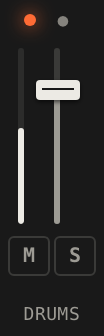
A label that starts or ends with an underscore, _ACID: or ACID_:, is a muted layer: it
comes up muted, and Reset mutes it again. This is the simplest performance feature you can write.
Three or four muted layers let a DJ build the song up in the mixer over a few minutes, and the song still reads as a
complete piece when every layer is in.
Keep drums in their own tracks, with plain names. The No drums pad finds percussion by name (drum, kick, bd, hat, hh, oh, clap, cp, snare, sd, perc, break, click, rim, cymbal, tom) or, failing that, by what the track plays in its first eight bars; if a track is mostly drum hits it counts. A DRUMS track that also carries the bass line takes the bass out with the drums. Separate tracks also make better snapshots, since a capture takes one channel alone, and a cleaner arrangement strip, which shows one row per label.
What a listener gets from each label: a fader with a meter, M and S, the keys 1 to 12, a ● to capture it, a row on the strip, a name to click in the code to mute it, and an entry in the song map. A song with no labels at all is one pattern: it plays, but there are no strips, no rows, nothing to capture and nothing for No drums to act on.
A song built as floors, each part on its own, two of them waiting with the lights off:
/*
  @title Four Floors
  Every part on its own floor: kick, hats, clap and bass each have a channel, so any one can step out.
  Two more wait with the lights off. Unmute ACID and STAB when the room is ready for them.
*/
setcps(124/60/4)

const drive = slider(700, 150, 3000)

KICK: s("bd*4")
  .bank("RolandTR909")
  .gain(0.9)
  ._punchcard()

HATS: s("[~ hh]*4, ~ ~ ~ oh")
  .bank("RolandTR909")
  .gain(0.4)

CLAP: s("~ cp ~ cp")
  .bank("RolandTR909")
  .gain(0.55)

BASS: note("<g1 g1 bb1 f1>*4")
  .struct("x ~ x ~ x ~ x x")
  .s("sawtooth")
  .lpf(drive)
  .gain(0.5)
  ._scope()

_ACID: note("g2 [~ g2] bb2 g2 ~ g3 f2 g2")
  .s("sawtooth")
  .lpf(sine.range(400, 2400).slow(4)).lpq(12)
  .decay(0.15).sustain(0)
  .gain(0.3)

_STAB: note("<[g3,bb3,d4] [f3,a3,c4]>")
  .struct("~ x ~ ~ x ~ ~ ~")
  .s("gm_epiano1")
  .delay(0.3)
  .gain(0.4)
Knobs as macros
A knob is the main way someone who has never seen Strudel touches your song. Signed-out visitors can turn knobs on
the featured beats, so a knob is often the first thing a stranger does with your music. The site makes every
slider(value, min, max) a knob; your job is to make each one a musical idea.
Name it with a const. const air = slider(0.35, 0, 0.9) shows as AIR
with a sub-label naming up to two of the parameters it feeds. An inline slider is named after its track and parameter,
which is accurate but says nothing about the music. Names that are musical ideas work best: PRESSURE, DARKNESS,
ENERGY, SPACE, DRIVE, AIR, CHAOS, TENSION. A knob called LPF is a technical fact; a knob called DARKNESS is an
invitation.
One const in several places is a macro. Use energy on the bass
filter, again scaled for the hats' level, and again for the pad's reverb, and one gesture changes three things at
once. The site lists every track a knob shapes in its tooltip (Shapes BASS, HATS, PAD). Two to five strong
knobs beat twelve subtle ones, and every position of each should sound good: a visitor will turn it all the way both
ways.
/*
  @title Pressure Cooker
  One knob, three jobs. "energy" opens the bass filter, lifts the hats and pushes the pad further back, all at once.
  Turn it down for a lid on the pot, up for a full boil.
*/
setcps(128/60/4)

const energy = slider(1200, 300, 4000)

KICK: s("bd*4, ~ cp ~ cp")
  .bank("RolandTR909")
  .gain(0.85)
  ._punchcard()

HATS: s("[~ hh]*4, hh*8")
  .bank("RolandTR909")
  .gain(energy.div(8000))

BASS: note("<a1 a1 c2 g1>*2")
  .struct("x ~ x x ~ x x ~")
  .s("sawtooth")
  .lpf(energy)
  .gain(0.5)
  ._scope()

PAD: note("<[a3,c4,e4] [a3,c4,e4] [c4,e4,g4] [g3,b3,d4]>")
  .s("gm_pad_warm")
  .attack(0.2).release(0.8)
  .room(energy.div(4000))
  .gain(0.3)
The readout follows the sound. A knob that reaches a filter, directly
(.lpf(cut)) or through .range(), .rangex(), .add(),
.mul() and the like with plain numbers (.lpf(haze.range(400, 3200))), reads in hertz or
kilohertz, showing the frequency the filter actually receives, not the slider's own number. A knob fed straight into
a frequency parameter, with a minimum above zero and a range of four times or more, also gets a logarithmic travel,
so 300 to 4000 feels even across the turn. A mapped knob keeps the curve its mapping gives it.
Write the range as plain positive numbers. The minimum and maximum are read only when they are
number literals: slider(0.5, 0, 1). A negative literal or an expression is not read, so
slider(0, -12, 12) becomes a knob from 0 to 12 and slider(1, 0, max * 2) a knob from 0 to 1.
Put the maths inside the chain instead: .add(detune.sub(12)). A fourth argument sets a step.
Turning a knob rewrites the number in the code without re-running the song, so a knob is instant and safe. Positions on a beat are remembered in the listener's browser, and Reset puts every knob back to the value you wrote, so write the value you want people to hear first.
Switches: versions, not tweaks
A switch is a plain whole number at the top level, const section = 0, whose meaning you spell out:
either in the header as a legend, section: 0 intro, 1 groove, 2 drop, or in a comment after the
statement that starts with a range, // 0-2. It appears before the knobs on the deck as a stepped control
with the option's name as its readout.
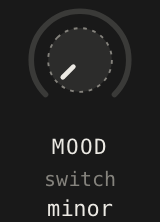
Because a switch re-runs the song (a moment after the turn settles), it can change anything: the scale, the drum pattern, which parts exist. That makes it the control for real versions, not fine adjustments: intro, groove and drop; minor and major; sparse and full; hook and verse. A knob is for things that should change while the music carries on; a switch is for things that need a new run.
The rules are short. Positions must count up by one from the first, there must be at least two, and the value in the code must be one of them; a number without a legend is just a number. Index lists with it, which is the one place a plain number does what a slider cannot:
const section = 0 // 0-2
DRUMS: s(["bd*2, hh*4", "bd*4, [~ cp]*2, hh*8", "bd*4, cp*2, hh*16"][section])
Two switches in one song, one from a header legend and one from a comment, with a scale and a whole arrangement hanging off them:
/*
  @title Two Doors
  Two numbers with a legend become switches. "section" opens the song a step at a time; "mood" picks which scale it walks.
  section: 0 intro, 1 groove, 2 drop
*/
setcps(120/60/4)

const section = 0
const mood = 0 // 0-1
const tone = slider(900, 200, 4000)
const key = ["E2:minor", "E2:dorian"][mood]

KICK: s(["bd ~ ~ ~", "bd*4", "bd*4"][section])
  .bank("RolandTR909")
  .gain(0.9)
  ._punchcard()

HATS: s(["~ ~ hh ~", "[~ hh]*4", "hh*8"][section])
  .bank("RolandTR909")
  .gain(0.4)

CLAP: s("~ cp ~ cp")
  .bank("RolandTR909")
  .gain([0.3, 0.5, 0.6][section])

BASS: n("<0 0 3 5>*2")
  .scale(key)
  .struct(["x ~ ~ ~ x ~ ~ ~", "x ~ x x ~ x ~ x", "x*8"][section])
  .s("sawtooth")
  .lpf(tone)
  .gain(0.5)
  ._scope()

LEAD: n("<[0 2 4 7] [7 4 2 0]>")
  .scale(key)
  .add(14)
  .s("triangle")
  .delay(0.3)
  .gain([0, 0.15, 0.25][section])
Suggestions: @try lines
A @try line in the header is a change the listener can hear with one tap and put back with another.
Treat them as lessons hidden in the song. Each should teach one Strudel idea: swap a bank, double a subdivision,
move an octave, change a rhythm's shape. They also appear in the first-steps list for new visitors, so for many
people a @try is the first edit they ever make.
@try 808 kit: `RolandTR909` -> `RolandTR808`
@try Busier: `hh*8` -> `hh*16`; `bd*4` -> `bd*8`
@try Glass bell: `s("triangle")` -> `s("sine")` in BELL- A label of up to 48 characters, a colon, then
`find`->`replace`in backticks. The arrow→works too. ;joins several changes into one tap.in NAMEkeeps the change inside one track. Without it, every place thefindtext appears outside comments is changed.- Up to four are shown, in the order written.

Pick text that is unique to the spot you mean. A chip is greyed, with the hint that that part of the
code has changed since, when the code no longer says find, when the replace text already
appears somewhere else in scope (so the site could not tell the change from its reversal), when two of its changes
would overlap, when the named track is missing, or when it would rewrite a knob's or a switch's number, which belongs
to the deck. So `0.5` -> `0.8` is a poor suggestion and `.room(0.5)` -> `.room(0.8)` is a
good one, as long as only one part has that reverb. A suggestion is read from the code itself, so it still works
after the listener has turned knobs or edited other lines.
Four suggestions, one idea each, the last scoped to one track:
/*
  @title Spare Change
  Four small changes, one idea each: a different kit, twice the hats, the bass an octave up, and chords in threes.
  Tap one over the stage to hear it; tap again to put it back.
  @try 808 kit: `RolandTR909` -> `RolandTR808`
  @try Double hats: `hh*8` -> `hh*16`
  @try Bass up an octave: `<a1 a1 c2 g1>` -> `<a2 a2 c3 g2>` in BASS
  @try Chords in threes: `~ x ~ x` -> `[~ x]*3`
*/
setcps(126/60/4)

const space = slider(0.3, 0, 0.8)

DRUMS: s("bd*4, [~ cp]*2, hh*8")
  .bank("RolandTR909")
  .gain(0.8)
  ._punchcard()

BASS: note("<a1 a1 c2 g1>*2")
  .struct("x ~ x x ~ x x ~")
  .s("sawtooth")
  .lpf(900)
  .gain(0.5)
  ._scope()

CHORDS: note("<[a3,c4,e4] [a3,c4,e4] [c4,e4,g4] [g3,b3,d4]>")
  .struct("~ x ~ x")
  .s("triangle")
  .room(space)
  .gain(0.3)
Notes for the song map
Beside the code (or behind Map when the window is narrow) the song map lists the song's sections: setup (the header, the tempo, sample packs), knobs and switches, parts, and the helpers parts share. Each entry describes itself from the code: the sounds it names, its effects in plain words, the knobs it uses. A click glides the code there, and the entry's card offers Edit this part.
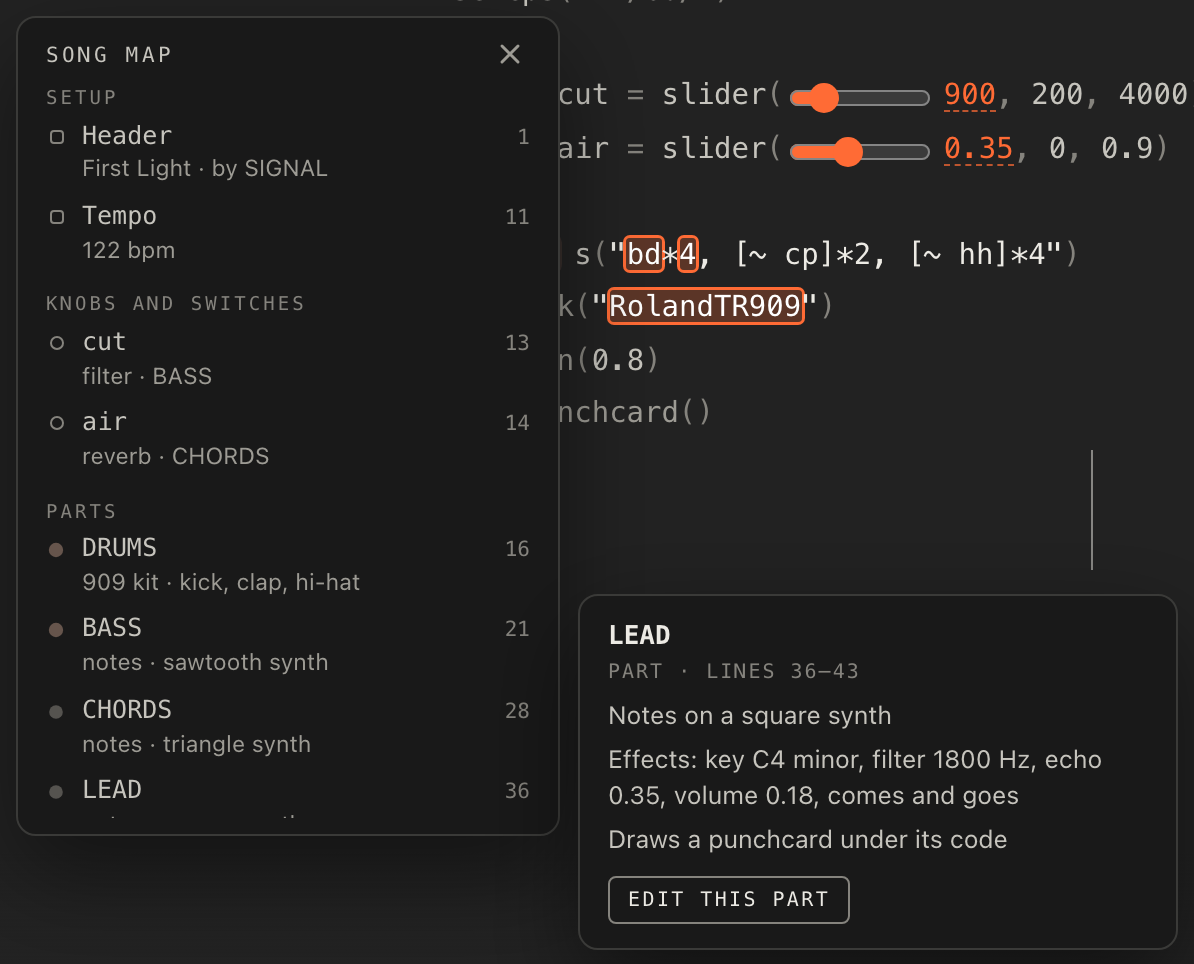
A comment in words becomes a part note, shown first on the card. The site takes an own-line comment that ends just above the part, or sits inside it, or follows it directly with a blank line after. It must contain a letter and not look like code; rows of dashes and commented-out code are ignored, so only real notes show; and it is cut at 160 characters. Header comments are never notes.
A good note says what the part is for and what to do with it, not what the code is: the bass follows the kick and ducks under it, bring these in when the room is ready, the only knob: how far away the keys sit. The code already says it is a sawtooth through a filter; the map reads that out for you.
// a dip on every beat, so the chords breathe with the kick
const duck = "[0.5 1]*4"

// a bass line that walks between two chords
BASS: note("<c2 c2 f2 g2>*2").s("square").lpf(600).gain(0.45)
Every part and helper with its own note, so the map reads like liner notes:
/*
  @title Harbour Lights
  A note above each part is what the song map shows for it. Open the map and read the song before you hear it.
  "haze" is the only knob: it sets how far away the keys and the pad sit.
*/
setcps(110/60/4)

// how far back the keys and the pad sit
const haze = slider(0.35, 0, 0.9)

// a dip on every beat, so the chords breathe with the kick
const duck = "[0.5 1]*4"

// kick on every beat, a clap on two and four, hats on the offbeats
DRUMS: s("bd*4, ~ cp ~ cp, [~ hh]*4")
  .bank("RolandTR808")
  .gain(0.8)
  ._punchcard()

// a bass line that walks between two chords
BASS: note("<c2 c2 f2 g2>*2")
  .struct("x ~ ~ x ~ x ~ ~")
  .s("square")
  .lpf(600)
  .gain(0.45)
  ._scope()

// electric piano chords, ducked by the helper above
KEYS: note("<[c4,eb4,g4] [c4,eb4,g4] [f3,ab3,c4] [g3,bb3,d4]>")
  .s("gm_epiano1")
  .gain(duck)
  .room(haze)

// a soft pad under everything, ducked the same way
PAD: note("<[c3,g3] [c3,g3] [f3,c4] [g3,d4]>")
  .s("gm_pad_halo")
  .attack(0.4).release(1)
  .gain(duck.mul(0.25))
  .room(haze)
Inline visuals
Six calls draw a live picture under the line they end: ._punchcard() (a grid of hits, best on drums),
._pianoroll() (notes over time, best on a melody), ._scope() (the waveform, best on a bass),
._spectrum(), ._spiral() and ._pitchwheel(). Each is an
inline visual: it lives under its own line on the stage, dims
while its track is muted, and is drawn into video clips. Put the call last in the chain
so it sits under the part it belongs to, and give the first three a width if the default 640 is too wide for the line.
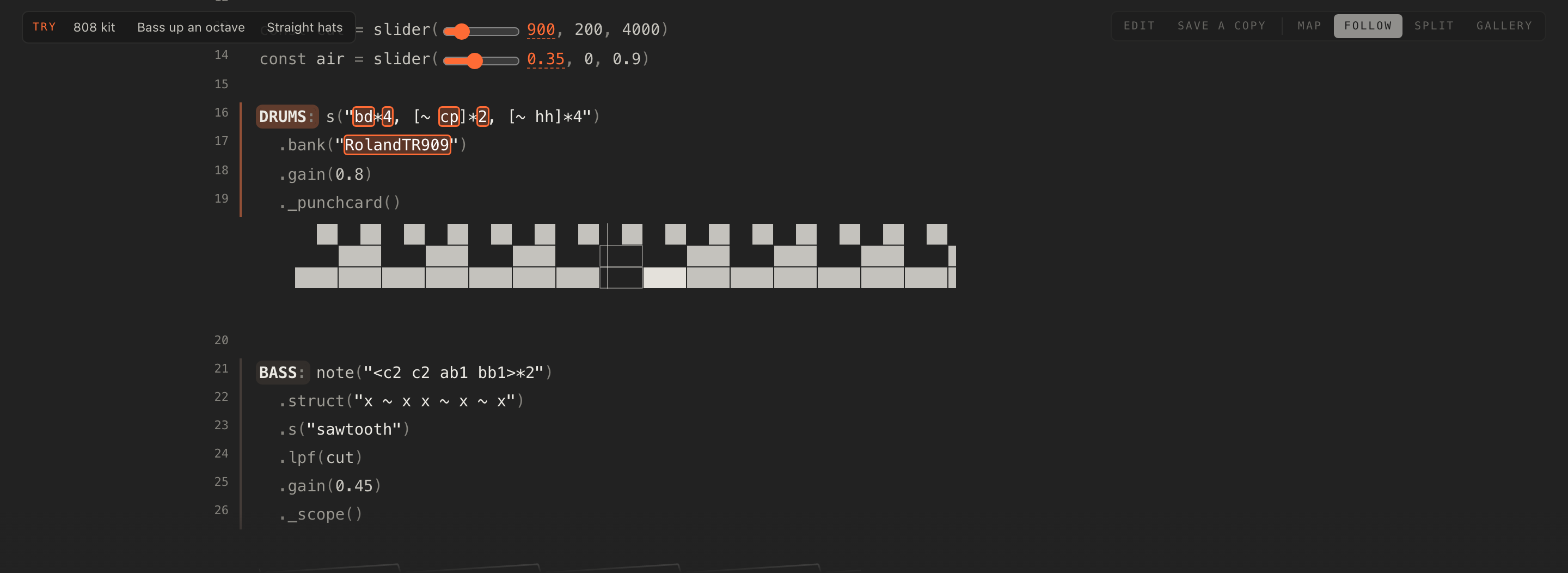
One or two per song reads best; a drawing under every line is a wall. A punchcard on the drums and a scope on the bass is a good default, with a pianoroll on a lead if the song has one. The stage lights up mini-notation word by word as each event sounds, so the more of your song lives in quoted patterns, the more the stage dances; long patterns built in JavaScript light up less.
The versions without the underscore, .punchcard(), .scope() and the rest, plus
.tscope(), .fscope() and .wordfall(), draw on a canvas behind the whole stage
at half strength rather than under their line, and are left out of clips. They work, but the inline ones are the
ones the site is built around. Hydra is not included.
/*
  @title Scope and Card
  Three drawings under three lines: a punchcard of the drums, the bass as a wave, the lead on a piano roll.
  Busy patterns make busy pictures, so every part keeps moving.
*/
setcps(126/60/4)

const cut = slider(1500, 300, 5000)

DRUMS: s("bd*4, [~ cp]*2, [hh*2 hh*3]*2, ~ ~ ~ [~ oh]")
  .bank("RolandTR909")
  .gain(0.8)
  ._punchcard()

BASS: note("<[e1 e1 e2 e1] [g1 g1 g2 g1] [a1 a1 a2 a1] [b1 b1 b2 a1]>*2")
  .s("sawtooth")
  .lpf(cut)
  .decay(0.2).sustain(0.1)
  .gain(0.5)
  ._scope()

LEAD: n("<[0 2 4 7 4 2 0 -3] [2 4 7 9 7 4 2 0]>")
  .scale("E4:minor")
  .s("triangle")
  .delay(0.3)
  .gain(0.25)
  ._pianoroll()
A 32-bar form
The arrangement strip under the stage shows which tracks play in each of 32 bars, one cycle per bar. A song that is the same loop for ever shows 32 identical bars, and a listener who trims it is editing a loop. A song with a shape shows that shape, and trimming and rearranging become musical decisions: cut the intro, keep only the drop, move the break earlier.

A shape that works for most things: bars 1 to 8 drums alone or nearly, 9 to 16 everything in, 17 to 24 the fullest stretch or a lift, 25 to 28 a break, 29 to 32 the way out. Techno tends to climb in straight lines, one element every four or eight bars and nothing leaving. Rap and trap want a hook and a verse that are the same length and swap cleanly, with the keys thinner under the verse. Experimental music can ignore all of it, but even there eight bars of something before the strangeness lets a DJ get in. Treat the shape as guidance, not a rule: the point is that the 32 bars tell a story.
Three ways to write it, in plain Strudel:
BASS: note("<f1 f1 ab1 c2>*2").s("sawtooth").lpf(900)
.mask("<0!8 1!24>")HATS: s("<[~ hh]*4 [~ hh]*4 [~ hh]*4 [hh*2 hh*3 hh*4 oh]>")all(x => arrange([8, x.ribbon(0, 8)], [16, x.ribbon(8, 16)], [8, x.ribbon(24, 8)]))
.mask() is the one the strip understands best, because it is what the strip writes. When a listener
silences a track for a stretch, the site adds a 32-step mask to the end of that track's chain, or rewrites one that
is already there. So a mask must be the last call in its chain, after the visual too, for
Silence and Bring back to find it; a mask buried in the middle is left alone and a
second one is added after it. Likewise the site recognises its own trim line by its exact form, so if you hand-edit
one keep the same shape. The strip sees the first 32 bars; a longer form plays, but only those bars are shown and
trimmed.
A whole shape in one loop, written with masks, so the strip shows it from the first bar:
/*
  @title Thirty-Two
  A whole shape in one loop: eight bars of drums alone, sixteen with everything, eight to come down again.
  The masks at the end of each part are what the arrangement strip reads.
*/
setcps(124/60/4)

const cut = slider(1000, 200, 4000)

DRUMS: s("bd*4, ~ cp ~ cp, [~ hh]*4, <~ ~ ~ [~ oh ~ ~]>")
  .bank("RolandTR909")
  .gain(0.8)
  ._punchcard()

BASS: note("<f1 f1 ab1 c2>*2")
  .struct("x ~ x x ~ x ~ x")
  .s("sawtooth")
  .lpf(cut)
  .gain(0.5)
  .mask("<0!8 1!16 0!8>")

CHORDS: note("<[f3,ab3,c4] [f3,ab3,c4] [ab3,c4,eb4] [c4,eb4,g4]>")
  .struct("~ x ~ x")
  .s("gm_epiano1")
  .room(0.4)
  .gain(0.4)
  .mask("<0!8 1!8 1!8 0!8>")

LEAD: n("<[0 ~ 3 5] [7 ~ 5 3] [0 ~ 3 5] [8 ~ 7 5]>")
  .scale("F4:minor")
  .s("triangle")
  .delay(0.3)
  .gain(0.2)
  .mask("<0!16 1!8 0!8>")
Parts that stand alone
A snapshot takes one channel alone, as it sounds now, for 1, 2, 4 or 8 bars, and keeps it on a pad to bring back in time, or to pin as a looping channel under another song. So a track that sounds good on its own is a gift: a riff, a vocal chop, a fill, a chord stab. Write at least one, give it its own label, and keep it musically separate from the parts around it: a capture takes that channel alone, with its own effects, and nothing else.
Think about length. A riff that takes two bars to say itself needs a four-bar capture to loop cleanly; a one-bar
drum pattern loops at one. Alternation that cycles every four bars, <a b c d>, captures whole at
four or eight bars and oddly at two. The listener chooses the length, but the song decides what lengths make sense.
/*
  @title Loose Riff
  One riff that stands on its own. Solo HOOK and it still works; the beat underneath is as plain as it gets.
  "shine" sets how much of the riff comes back as an echo.
*/
setcps(120/60/4)

const shine = slider(0.3, 0, 0.7)

HOOK: n("<[0 ~ 3 ~ 5 ~ 3 7] [0 ~ 3 ~ 5 ~ 10 7]>")
  .scale("G3:minor")
  .s("gm_lead_2_sawtooth")
  .lpf(2200)
  .delay(shine)
  .gain(0.35)
  ._pianoroll()

KICK: s("bd*4")
  .bank("RolandTR909")
  .gain(0.85)
  ._punchcard()

HATS: s("[~ hh]*4")
  .bank("RolandTR909")
  .gain(0.4)
Write for the decks
Two decks play two songs at once, kept in time, with a crossfader between them, pads on the master and a mixer on each. None of this is yours to code, but knowing it is there changes what you write.
- Declare the tempo.
setcps(bpm/60/4)orsetcpm(bpm/4), so the deck shows a BPM and Sync can bring the other deck in at it. A song without one has no tempo to sync to. The tempo knob bends a deck by up to a quarter either way, so two songs a little apart in tempo still meet. - Eight bars of drums at each end. A song that starts with drums alone and ends the same way is easy to bring in over another and easy to leave. Masks do it in two lines.
- Leave headroom. Two songs sum on the master, and a limiter after them holds the output under full scale, turning the meter orange when it works hard. Keep the gains modest and the limiter stays idle, and the two songs have room to sit together.
- Leave the pads something to do. The listener has echo, a filter drop and a reverb wash of their own. A song already drowned in reverb and delay has nowhere to go when a pad is held; a drier song comes alive under one.
- Muted layers to build up live. Two or three
_LAYER:tracks give a DJ a song that grows in the mixer over minutes, which is how a set is built. - Design the first 8 to 16 bars for clips. A video clip records 4, 8, 16 or 32 bars from the next bar line, with the code lit and the visuals drawn, and most people press record near the top of a song. The opening is what gets posted, so make it look and sound like the song.
The sound palette
Before any song runs, the site loads a set of sounds every song can rely on. Nothing in this table needs a samples() line.
| Sounds | How to reach them |
|---|---|
| The drum machines | .bank("RolandTR909"), "RolandTR808" and dozens more from the tidal-drum-machines collection, with the usual drum names: bd sd hh oh cp rim cr lt mt ht. The short aliases work too. |
| Dirt-Samples | The classic TidalCycles pack: s("casio"), breaks, hits and voices. Use :n or .n() to pick a sample within a name. |
| Piano, VCSL, mridangam | A sampled piano, the VCSL orchestral and percussion library, and a mridangam, each by its sample names. |
| The uzu drumkit | Strudel's own kit, by its drum names. |
| The synths | sine, triangle, square, sawtooth, supersaw, and the noises white, pink, brown and crackle. |
| General MIDI soundfonts | Every gm_ instrument: gm_epiano1, gm_pad_halo, gm_lead_2_sawtooth and the rest. Each loads the first time it is played. |
| ZZFX | Strudel's small synthesised effects, by their names. |
Anything else is a sample pack, loaded with samples('github:user/repo') or
from any address that allows cross-origin requests; there is no list of approved packs. Packs on GitHub,
felixroos.github.io and Shabda are kept on the device once heard, so a song plays offline the second time. The site
waits about seven seconds for a pack; after that the song starts without it, the status says Still waiting for
sample pack, and the missing sounds come in when the pack arrives. So keep packs small and public, name only the
ones the song plays, and credit them in the header. The About page credits the packs the site's own beats use;
your song's notes are where you credit yours.
The sounds strudel.cc lists on its samples page are the same ones,
and that page explains samples() in full.
Four genre sketches
Four short songs, each a working example of a style and of the ideas on this page. Open any of them in the player, and Save a copy keeps it to take apart.
Techno
Ballast is a long straight build at 134: the kick is there from the first bar and never leaves, the hats arrive at
bar 5, percussion at 9, the pad at 17. Listen for how PRESSURE opens the bass and the pad together, which is the
macro idea from above, and for how the .mask() at the end of each later chain is what
draws the climb on the strip. ACID waits muted for the second half, a layer for the mixer. The two
suggestions each swap one word.
/*
  @title Ballast
  A long straight build at 134: the kick is there from the first bar, the rest climbs on over thirty-two.
  "pressure" opens the bass and the pad together. ACID waits, muted, for the second half.
  @try 808 kick: `RolandTR909` -> `RolandTR808` in KICK
  @try Sixteenth hats: `[~ hh]*4` -> `hh*16`
*/
setcps(134/60/4)

const pressure = slider(900, 200, 4000)

KICK: s("bd*4").bank("RolandTR909").gain(0.9)
  ._punchcard()

HATS: s("[~ hh]*4, ~ ~ oh ~").bank("RolandTR909").gain(0.4)
  .mask("<0!4 1!28>")

PERC: s("rim(5,8), ~ ~ ~ [~ cp]").bank("RolandTR909").gain(0.4)
  .mask("<0!8 1!24>")

BASS: note("<e1 e1 e1 g1>*2")
  .struct("x ~ x x ~ x x ~")
  .s("sawtooth")
  .lpf(pressure)
  .decay(0.15).sustain(0.05)
  .gain(0.5)
  ._scope()

_ACID: note("e2 [~ e2] g2 e2 ~ e3 d2 e2")
  .s("sawtooth")
  .lpf(sine.range(300, 2800).slow(8)).lpq(14)
  .decay(0.12).sustain(0)
  .gain(0.3)

ATMOS: note("<[e3,b3] [e3,b3] [g3,d4] [d3,a3]>")
  .s("gm_pad_sweep")
  .attack(0.5).release(2)
  .lpf(pressure)
  .gain(0.25)
  .mask("<0!16 1!16>")
Trap
Half Light is half-time at 140: a kick that lands late, a snare on three, hats that roll in sixteenths and double
up every other bar through <…> alternation. The sub slides between two notes on a sine, and WEIGHT
is its level. The part switch is a hook and a verse that are the same length, with the keys thinner under
the verse, and STAB stays muted until the hook needs it. Room is left for a voice.
/*
  @title Half Light
  Half-time at 140: a kick that lands late, a snare on three, hats that roll. The sub slides between two notes.
  Room is left for a voice; "part" takes the keys down for a verse. STAB is muted until the hook needs it.
  part: 0 hook, 1 verse
*/
setcps(140/60/4)

const part = 0
const weight = slider(0.6, 0.2, 1)

KICK: s("bd ~ ~ ~ ~ ~ bd ~")
  .bank("RolandTR808")
  .gain(0.9)
  ._punchcard()

SNARE: s("~ ~ sd ~")
  .bank("RolandTR808")
  .gain(0.7)

HATS: s("<hh*16 [hh*8 hh*16]>")
  .bank("RolandTR808")
  .gain("[0.4 0.2]*8")

SUB: note("<f1 f1 ab1 [f1 eb1]>")
  .s("sine")
  .decay(0.6).sustain(0.3)
  .gain(weight)
  ._scope()

KEYS: note("<[f3,ab3,c4] ~ [eb3,g3,bb3] ~>")
  .s("gm_epiano1")
  .room(0.5)
  .gain([0.35, 0.15][part])

_STAB: note("<f4 ~ ~ eb4>")
  .struct("x ~ ~ ~ ~ ~ x ~")
  .s("gm_lead_6_voice")
  .delay(0.4)
  .gain(0.3)
House
Paper Street is plain house at 124: four on the floor, a clap on two and four, open hats on the off-beats, piano chords on top. Listen for the form: the first eight bars and the last eight are drums only, so it mixes in and out on the other deck, which is the DJ advice made audible. FILTER is one macro on the bass and the chords, and the second suggestion rewrites a whole mask to bring the bass in from the start.
/*
  @title Paper Street
  Plain house at 124: four on the floor, a clap on two and four, open hats on the off-beats, piano chords on top.
  The first eight bars and the last eight are drums only, so it mixes in and out. STAB waits, muted.
  @try 808 kit: `RolandTR909` -> `RolandTR808`
  @try Bass in from the start: `.mask("<0!8 1!16 0!8>")` -> `.mask("<1!32>")` in BASS
*/
setcps(124/60/4)

const filter = slider(1400, 300, 5000)

KICK: s("bd*4").bank("RolandTR909").gain(0.9)
  ._punchcard()

CLAP: s("~ cp ~ cp").bank("RolandTR909").gain(0.55)

HATS: s("[~ oh]*4").bank("RolandTR909").gain(0.3)

BASS: note("<a1 a1 d2 e2>*2")
  .struct("~ x ~ x ~ x ~ x")
  .s("sawtooth")
  .lpf(filter)
  .gain(0.5)
  .mask("<0!8 1!16 0!8>")

CHORDS: note("<[a3,c4,e4] [a3,c4,e4] [d4,f4,a4] [e4,g4,b4]>")
  .struct("~ x ~ x ~ x [x ~] ~")
  .s("gm_epiano1")
  .lpf(filter)
  .room(0.3)
  .gain(0.4)
  .mask("<0!8 1!16 0!8>")

_STAB: note("<[a4,e5] ~ [d5,a5] ~>")
  .struct("~ ~ x ~")
  .s("square")
  .delay(0.35)
  .gain(0.2)
Experimental
Loose Teeth lines nothing up on purpose: kicks in threes over eight, hats in fives, a bass line seven bars long so
it drifts against everything. CHAOS drops notes at random, and the texture switch adds grit from a noise
track. It is short and odd, which makes it good snapshot material, and its spiral and pitch wheel show the two
visuals the other sketches do not use.
/*
  @title Loose Teeth
  Nothing lines up on purpose: kicks in threes over eight, hats in fives, a bass that is seven bars long.
  "chaos" drops notes at random; "texture" adds grit. Short, odd, and good for a snapshot.
  texture: 0 bare, 1 grit
*/
setcps(112/60/4)

const texture = 0
const chaos = slider(0.2, 0, 0.8)

KICK: s("bd(3,8)").bank("RolandTR808").gain(0.85)
  ._punchcard()

HATS: s("hh(5,8), ~ ~ ~ oh").bank("RolandTR808")
  .degradeBy(chaos)
  .gain(0.4)

BASS: note("<c2 c2 eb2 c2 g1 c2 f2>")
  .s("square")
  .lpf(500)
  .decay(0.2).sustain(0.1)
  .gain(0.5)
  ._spiral()

GRIT: s(["pink", "white"][texture])
  .struct("~ x ~ ~ ~ x ~ ~")
  .decay(0.08).sustain(0)
  .hpf(3000)
  .gain([0.05, 0.12][texture])

BELLS: n("<0 3 7 10 7>")
  .scale("C5:minor")
  .s("triangle")
  .sometimesBy(0.3, (x) => x.add(12))
  .degradeBy(chaos)
  .delay(0.4)
  .gain(0.2)
  ._pitchwheel()
Before you hand a song over
@title,@by, and a sentence or two of notes written for a listenersetcps(bpm/60/4)orsetcpm(bpm/4), one cycle per bar- Every part labelled, drums in their own tracks with plain names
- Two to five knobs as named
constsliders, with plain positive numbers for the range, musical across the whole turn - A switch for real versions of the song, if it has them, with a legend in the header or a
// 0-2comment - Two to four
@trylines that each teach one idea, with find text unique to the spot - A comment in words above each part, for the song map
- One or two inline visuals, last in their chain, or just before the mask
- A 32-bar form that shows on the arrangement strip, with every
.mask()the last call in its chain - At least one part that stands alone as a snapshot
- Eight bars of drums at each end, and some headroom, for the other deck
- The first 8 to 16 bars standing on their own, for clips
- Sample packs small, public and credited, and only the ones the song plays
- Double quotes for patterns, single quotes for strings, and no
slider()used as an index
Then share it: Share explains the link, and Let the site feature this offers it for the community shelf.